Windows Support Australia

  • Subscribe to our RSS feed.
  • Twitter
  • StumbleUpon
  • Reddit
  • Facebook
  • Digg

Thursday, 14 November 2013

Extending Omegalib With Custom Modules

Posted on 16:37 by Unknown
Starting form version 5.0, omegalib features a fully modular design. This new design allows users to start with a very lightweight version of omegalib, and customize it with the modules they need. Modules are kept in separate repositories so each revision history is separate, and development by different users is easier. When needed you can create your own modules in C++ or python, save them into a github repository and make them accessible to other omegalib users. Omegalib does the following to perform module search and installation:
  • During the first cmake configuration, a module list file is downloaded from a specific github repository, called the module hub. The predefined module hub is http://github.com/omega-hub/hub, and it can be customized by setting the OMEGA_HUB_URL CMake variable. Changing the hub repository is useful if you want to maintan your own module list.
  • The module list file is simply a CMakeLists.txt file containing a list of available modules, the url of their github repository and a brief description.
  • CMake populates a list with checkable boxes for each module in the list
  • The user clicks on modules that should be installed, or lists their names in the MODULES CMake variable. The variable is particularly useful for command line configurations: for instance, typing cmake [path-to-omega-source] -DMODULES="cyclops sprite omegaVtk" will setup an omegalib build environment with the cyclops, sprite and omegaVtk modules (and all their dependencies)
  • CMake clones the github repositories of all the selected modules. The repositories get cloned in the /modules directory. CMake then runs the CMakeLists.txt file for each module. This file is used to setup the builds of native C++ modules, specify install commands, and lists module dependencies. The module dependencies are used to install additional required modules.
  • The user does a cmake configure (possibly multiple times), until all the modules are downloaded and all the dependencies have been resolved.
  • the build environment is ready

Creating a module

Omegalib modules can be created in C++ or python. This section will document steps common to both module types. Folowing sections will detail how to develop modules in each language.

Setting up a module development environment

The first step in creating a module is choosing a name for it. Make sure the name is unique (not shared with other modules), and as explanatory as possible.
You should create a directory in /modules with your module name. All your module code and data will be in this directory.
Each module directory should contain at least a file: CMakeLists.txt. For very simple modules with no dependencies, this file can be empty. This file can also contain a list of dependencies, modules needed my this module to work. Dependencies are specified using therequest_dependency() command. Note thas this makes it possible to create bundle modules: empty modules that contain only a CMakeLists file enumerating other modules. When users install a bundle module, all modules listed as dependencies will be installed automatically. This makes it practical to create pre-packaged distributions. See the vr-bundle module for an example of this (https://github.com/omega-hub/vr-bundle)

Python Modules

In addition to the CMakeLists file, python modules should contain at least an __init__.py file. This file will be executed when users import the module using an import moduleName pyton statement. For simple modules, all you code can be placed in init.py. For more complex modules with multiple classes or scripts, init.py should in turn import each one of those modules.

example

This is an example of a python module called sphereMaker, containing a single function makeSphere that can be used to, you guessed, create sphere objects. We assume this module depends on the cyclop module. The module directory (which should be/modules/sphereMaker) will contain the following three files:
CMakeLists.txt
# Tell omegalib this module depends on another module (cyclops). Cyclops will
# be automatically installed when this module is enabled.
request_dependency(cyclops)
init.py
# Just import the sphereMakerFunctions file, it will contain our actual function
from sphereMakerFunctions import *
sphereMakerFunctions.py
from cyclops import *
from omega import *
from euclid import *
def makeSphere(x, y, z, color):
sp = SphereShape.create(1, 2)
sp.setPosition(x, y, z)
sp.setEffect("colored -e " + color)
return sp
...and that's it!
Now, in an omegalib application script or interactive console you can type the following to create a red sphere:
from sphereMaker import *
makeSphere(0, 2, -2, 'red')

C++ Modules

The following is an example of a CMakeLists.txt file that creates an omegalib C++ module:
request_dependency(cyclops)

# The following line makes sure the cyclops module is installed.
if(TARGET cyclops)
# Set the module name here
SET(MODULE_NAME templateModule)

# Set module name and source files here
add_library(${MODULE_NAME} MODULE
templateModule.cpp)

# Set the module library dependencies here
target_link_libraries(${MODULE_NAME}
omega
omegaToolkit
cyclops)

#------------------------------------------------------------------------------
# DO NOT MODIFY ANYTHING BELOW AFTER THIS LINE
set_target_properties(${MODULE_NAME} PROPERTIES PREFIX "")
if(WIN32)
set_target_properties(${MODULE_NAME} PROPERTIES FOLDER modules SUFFIX ".pyd")
endif()
endif()

Python Interface Declaration

C++ classes and methods are exposed using a module declaration section in your source file. The module declaration lists all the classes and methods you want to expose, together with some minimal information about how they work. Here is an example of a module declaration:
BOOST_PYTHON_MODULE(templateModule)
{
// SceneLoader
PYAPI_REF_BASE_CLASS(HelloModule)
PYAPI_STATIC_REF_GETTER(HelloModule, createAndInitialize)
PYAPI_METHOD(HelloModule, setObjectColor)
;
}
The module declaration uses a set of macros that internally use Boost::python to interface python and C++. The previous declaration creates a module named templateModule, containing a class HelloModule with a static and nonstatic method.
For a full reference on the Python Interface Declaration see this section
Publishing your module
To make your module accessible to other developers you need to do two things: commit it to a new git repository (we suggest using GitHub to host your repository), and add it to the master module list. The default master module list is hosted in the https://github.com/omega-hub/hub repository (see https://github.com/omega-hub/hub/blob/master/CMakeLists.txt). You should fork this repository and modify its CMakeLists file to add your module. In your installation, you can tell CMake to use your fork of the master module list: 
If you want to share your module with others, send a pull request on the omega-hub repository.
Read More
Posted in omegalib | No comments

Friday, 1 November 2013

Omegalib 5.0 released!

Posted on 20:11 by Unknown
This version will introduce physics support in cyclops and will ship with updated versions of several internal libraries (OpenSceneGraph, osgWorks, FBX). No API breaks are planned for this version, but due to changes in the dependency structure, a full, clean rebuild will be needed after updating to this version. This release notes will still list changes to external modules that are considered part of the core omegalib distribution: omegaOsg, omegaVtk and cyclops.
breaking change the cyclops shadow API has been deeply revised. Old apps using the shadow API will need to be modified (the old shadow system was quite buggy so I don't expect any application except for experiments making use of the old API)
function change In cyclops newly added lights are enabled by default.

Major Changes

general
  • OpenScenegraph is now built automatically instead of being downloaded as a binary dependency
  • Fixed several project dependencies in the build scripts. omegalib should now compile without hiccups during parallel builds (make -j 32is your friend)
cyclops
  • Added multi-texture support in Material C++ and Python API
  • Physics support (RigidBody API)
  • SceneLayer API
  • Single pass multiple shadow map support
Read More
Posted in omegalib | No comments

Thursday, 31 October 2013

Installing Modules In Omegalib 5.0

Posted on 19:08 by Unknown
How to install omegalib modules using the CMake GUI
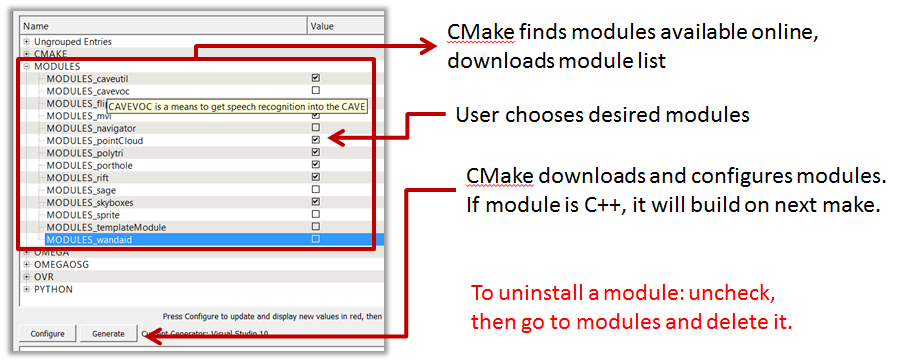
Starting form version 5.0 (which will become the master version in a few days), omegalib features a fully modular design. This new design allows users to start with a very lightweight version of omegalib, and customize it with the modules they need. Modules are kept in separate repositories so each revision history is separate, and development by different users is easier. Modules can be installed at configuration time in CMake, either by clicking on the checkboxes for modules you want to install, or by listing the desired module names in the MODULES cmake variable.

How does omegalib install modules

Omegalib does the following to perform module search and installation:
  • During the first cmake configuration, a module list file is downloaded from a specific github repository, called the module hub. The predefined module hub is http://github.com/omega-hub/hub, and it can be customized by setting the OMEGA_HUB_URL CMake variable. Changing the hub repository is useful if you want to maintan your own module list.
  • The module list file is simply a CMakeLists.txt file containing a list of available modules, the url of their github repository and a brief description.
  • CMake populates a list with checkable boxes for each module in the list
  • The user clicks on modules that should be installed, or lists their names in the MODULES CMake variable. The variable is particularly useful for command line configurations: for instance, typing cmake [path-to-omega-source] -DMODULES="cyclops sprite omegaVtk" will setup an omegalib build environment with the cyclops, sprite and omegaVtk modules (and all their dependencies)
  • CMake clones the github repositories of all the selected modules. The repositories get cloned in the /modules directory. CMake then runs the CMakeLists.txt file for each module. This file is used to setup the builds of native C++ modules, specify install commands, and lists module dependencies. The module dependencies are used to install additional required modules.
  • The user does a cmake configure (possibly multiple times), until all the modules are downloaded and all the dependencies have been resolved.
  • the build environment is ready
Due to its new modular design, a few modules that were previously included in the omegalib core are now offered as separate modules. In particular these modules are cyclops, omegaOsg, omegaVtk, rift, mvi, caveutil, cavevoc, sprite, pointCloud.
If you want to create a cmake build that contains all the modules previously offered with omegalib 4.x (and a few more), simply use this cmake command:
build> cmake <path-to-omega-source> -DMODULES="vr-bundle"
The vr-bundle module (you can see it here: https://github.com/omega-hub/vr-bundle/blob/master/CMakeLists.txt) is a simple, empty bundle module that just installs all the previously listed modules as its dependencies.
Read More
Posted in omegalib | No comments

Saturday, 19 October 2013

Omegalib 4.3 released, and a new CAVE2 Opens in Australia!

Posted on 07:50 by Unknown
Omegalib version 4.3 is a minor release that introduces shader-based widget rendering in omegaToolkit, and several other minor fixes and improvements.

Major Changes

omegaToolkit
  • Improved Container python API
  • Widgets now render through shader (mostly done to simplify alpha modulation but could have other uses in the future)
  • Fixed Mouse ButtonUp event flags
  • (4.3.1) Container clipping support

Omegalib is also running on a brand new CAVE2 installation on the other side of the world! Monash University in Melbourne, Australia, recently finished assembling their CAVE2 system in their new state-of-the art New Horizons facility. We are looking forward to some awesome collaboration possibilities with our new friends from Monash!

The Monash CAVE2 running the omegalib Connectome Demo. For more information see This Article


Read More
Posted in CAVE2, omegalib | No comments

Tuesday, 24 September 2013

A widget library for large scale displays and immersive environments

Posted on 15:38 by Unknown

An example of widgets rendered to a cube texture
In CAVE2, most omegalib applications display a user interface using the 3D menu system. On menus, it is possible to create a variety of standard controls like buttons, sliders, sub-menus etc. Internally, the menu system makes use of the omegalib widget library, which is part of omegaToolkit. This library is designed to support rendering of 2D widgets on large scale, cluster-driven displays. Since we want to support stereo displays, the widget library supports 3D rendering: Widget containers can draw themselves to arbitrary surfaces in the scene. That's how the menu system 3D mode works, but you can do the same with your own widgets, using the Container3DSettings class. Container output planes can also be attached to scene nodes, using the Container3DSettings.node  property. For instance, you can attach a 3D mode container to the default camera, to implement a 3D heads-up display. Or you can attach it to a movable object in the scene, to create a floating 3D label that follows the object. The Text3D class can be used for simple text-only labels, but the widget library gives you a lot more flexibility with your label design, and the kinds of data you can put on it. If you need more control over the output surface, you can also grab the container output texture directly and use it as a 3D object texture. See https://github.com/uic-evl/omegalib/blob/master/examples/python/uitotexture.py for an example of this.

Of course the widget library can be used to draw classic 2D interfaces. The ohelloWidgets C++ demo shows how to use the widget toolkit for 2D drawing. It also shows how to create custom widgets using OpenGL.
Widgets, widgets everywhere!
In order to support very different devices like your laptop, OmegaDesk, touch walls and CAVE2, the widget library accepts a variety of input sources to control interaction. Like the rest of omegalib, input handling is based on omicron, making it possible to interact with widgets using mouse pointers, SAGE pointers, touch screens, gamepads, tracked wands etc. In particular, widgets support both pointer-based and gamepad-based interaction. An interface can be used with a mouse or navigated with a game controller d-pad. The interaction mode (and a bunch of other properties of the widget library) can be specified in the omegalib configuration file.

When using gamepad navigation, the widget library does most of the work for you. For instance, putting widgets in a vertical layout container, will automatically set up navigation so that pressing the up/down buttons on a gamepad will move widget selection up and down. The same happens for horizontal containers. For free-layouts, or for navigation between containers, you can explicitly `link` widgets together to tell omegalib how interface navigation should work. This is done using the Widgets setPrevHorizontalWidget, setPrevVerticalWidget, setNextHorizontalWidget  and setNextVerticalWidget methods. The menuColumns example shows how to use custom navigation to create a multi-column menu.
Read More
Posted in omegalib | No comments

Saturday, 7 September 2013

Omegalib 4.2 released!

Posted on 14:53 by Unknown

This version greatly improves the speed of user-centered stereo tracking in cluster installations. The Equalizer/omegalib interface and rendering code has also been simplified. Porthole is now included as a separate module. The flipbookPlayer module has also been moved from the apps repository to the omegalib core repository. To support multi-view interaction, omegalib 4.2 also introduces ray-based wand event filtering: multiple applications can be controlled using the same wand device. Only the application currently pointed at receives input. Multi-view interaction is implemented in a new module (**mvi**).
breaking change: the overridePanopticStereo function has been removed due to its confusing name. The same function can now be controlled by doing getDisplayConfig.panopticStereoEnabled = True / False

Major Changes

omega
  • removed obsolete Equalizer statistics output
  • added New statistics display in Console overlay
  • Render passes get sorted by priority
  • added SceneNode.rotate(Quaternion) python method.
  • fixes to event handling and rendering on non-planar configurations.
  • added querySceneRay flags (see https://github.com/uic-evl/omegalib/wiki/Scene-management#queryscenerayvector3-origin-vector3-dir-callback-flags)
  • added Event.isFlagSet to python API
  • added PixelData pixel access python API (getPixel[R,G,B,A] and setPixel functions)
  • Degree unit functions for node orientation (Issue #57)
Porthole
  • Porthole improved and moved to a separate module
  • Added touch / drag event forwarding
  • Added callbacks for client connection and camera creation
  • Added portholeBasic.py python demo
cyclops
  • AnimatedObject.setCurrentModelIndex in python (Issue #50)
Misc
  • Started working on a multiview interaction (mvi) module.
Read More
Posted in CAVE2, omegali | No comments

Monday, 12 August 2013

Omegalib 4.1 Released!

Posted on 13:44 by Unknown
An multiview osg+vtk omegalib 4.1 application has been used to analyse sonar data collected during the NASA ENDURANCE exploration of Lake Bonney, Antarctica.
This version adds experimental support for the Oculus Rift head mounted display through a custom omegalib module, and introduces major improvements to mission control client-to-client communication support.

Major Changes

omega
  • death switch timeout automatically kills stuck slave instances
  • getButtonSetting python function
  • event dispatching enable / disable functions
  • tile show/hide commands
  • improved bounding box calculation
  • SceneNode.setChildrenVisible
  • Python event callbacks process events as modules with NORMAL priority level, instead of processing them after all modules (i.e. below Lowest priority). This allows python event callbacks to mark events as processed before they are passed to lower-priority modules.
  • python MissionControlClient class. Other improvements to mission control support
  • removed -mc client command line option. Mission control clients can be controlled directly through scripting now.
  • Fixed Node.lookAt
  • Cleaned up GPU resource allocation
  • Extended the SceneNode python API with rlative transform methods and other utility methods.
  • 4.1.1 Fix: incorrect C++ to python data layout for Quaternion
omegaToolkit
  • Wand manipulator quick commands for enabling move/rotate/scale
  • improved Button widget customization
omegaOsg
  • FIX fixed depth test issue on some linux installs
cyclops
  • FIX scene tree removal / addition of subtrees
omegaVtk
  • FIX actor bounding box and draw settings.
Download source code here: https://github.com/febret/omegalib/releases/tag/v4.1.1
A precompiled windows binary can be found here: https://github.com/febret/omegalib-windows/archive/v4.1.1.zip
Read More
Posted in CAVE2, ENDURANCE, omegalib | No comments
Older Posts Home
Subscribe to: Comments (Atom)

Popular Posts

  • ENDURANCE Final Update
    Work on the ENDURANCE project has ended. The final data products consisted in an updated bathymetry model for the entire west lake bonney, u...
  • (no title)
    A list of Wiki tools I can choose among for Edanarion documentation: http://wikkawiki.org/HomePage http://wiki.splitbrain.org/ http://www.me...
  • Parallel Gaussian Elimination Using MPI
    In this project, we had to implement a parallel solver for linear equation systems, using a technique known as Gaussian elimination (GE). As...
  • GPU Programming Project 1 – Kodachrome
      The objective for this project was to process a stream of images captured from the webcam, and apply a set of vertex, fragment and geomet...
  • Omegalib 4.2 released!
    This version greatly improves the speed of user-centered stereo tracking in cluster installations. The Equalizer/omegalib interface and re...
  • Distributed Sum on a 2D mesh using MPI
    For a recent class project, we had to implement an algorithm to sum an array of integers on a computer cluster. This problem is one of the e...
  • Google Chrome vulnerable to carpet-bombing flaw
    Google Chrome vulnerable to carpet-bombing flaw Google’s shiny new Web browser is vulnerable to a carpet-bombing vulnerability that could ex...
  • Using Kinect for 3D video capture
    (Thanks for the link, Jakub)
  • Usability in Games
    New project added on the website: Usability in Games. We are investigating how interface usability influences user engagement in long-term c...
  • Omegalib 3.0 Released
    Omegalib 3.0 is a major improvement over the 2.0 distribution. It is the version used on the first public demos of the  CAVE2  virtual reali...

Categories

  • 3D
  • CAVE2
  • Edanarion
  • ENDURANCE
  • Flash
  • Game Heuristics
  • Games
  • HCI
  • Hydroviz
  • MotoGP08
  • MPI
  • News
  • Nintendo DS
  • OmegaDesk
  • omegali
  • omegalib
  • Papervision
  • QbViz
  • Tech Meeting
  • Visualization
  • VR

Blog Archive

  • ▼  2013 (31)
    • ▼  November (2)
      • Extending Omegalib With Custom Modules
      • Omegalib 5.0 released!
    • ►  October (2)
    • ►  September (2)
    • ►  August (1)
    • ►  June (4)
    • ►  May (3)
    • ►  April (4)
    • ►  March (6)
    • ►  February (4)
    • ►  January (3)
  • ►  2012 (8)
    • ►  December (3)
    • ►  November (2)
    • ►  August (3)
  • ►  2011 (2)
    • ►  November (1)
    • ►  January (1)
  • ►  2010 (4)
    • ►  November (1)
    • ►  February (1)
    • ►  January (2)
  • ►  2009 (5)
    • ►  September (1)
    • ►  June (1)
    • ►  April (1)
    • ►  March (1)
    • ►  January (1)
  • ►  2008 (22)
    • ►  December (1)
    • ►  October (4)
    • ►  September (6)
    • ►  June (2)
    • ►  May (3)
    • ►  April (1)
    • ►  March (2)
    • ►  January (3)
  • ►  2007 (16)
    • ►  December (2)
    • ►  November (3)
    • ►  October (4)
    • ►  September (7)
Powered by Blogger.

About Me

Unknown
View my complete profile